WooCommerce, Shopify, and Magento 2 messaging integrations look similar on the surface, but they run on three different trigger mechanisms, two different setup paths, and one genuinely different commercial model. A side-by-side breakdown of what each one covers and what still needs manual setup.
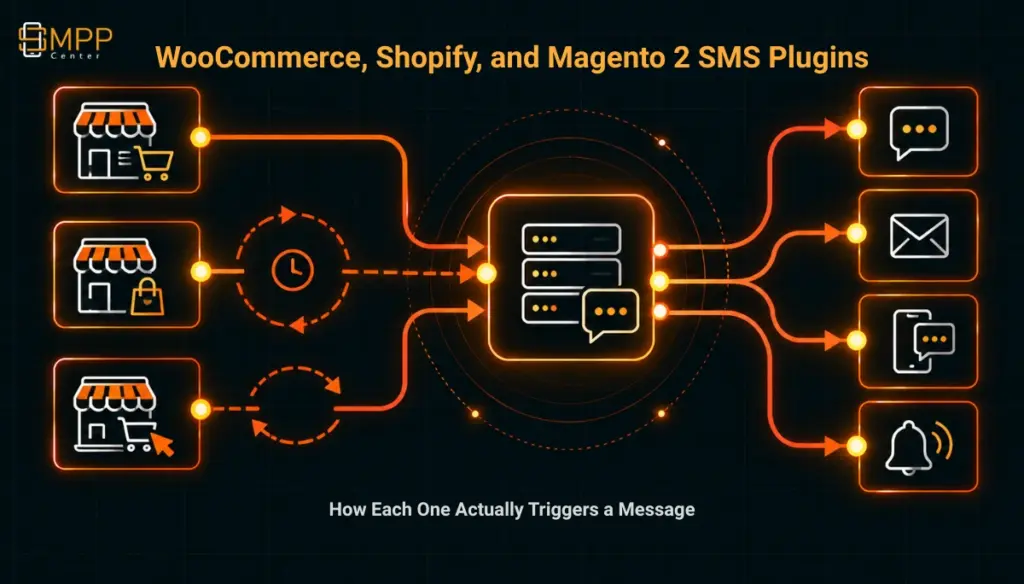
Table of Contents
- The Short Answer
- TL;DR
- Shared Shape
- The WooCommerce Plugin
- The Shopify App
- The Magento 2 Connector
- Side-by-Side Comparison
- Push vs. Poll
- Automated vs. Manual
- Next Steps
- FAQs
The Short Answer
All three integrations, WooCommerce, Shopify, and Magento 2, cover the same core events: order placed, order status changed, shipment created, abandoned cart, and new customer registration, sent over SMS, WhatsApp, Voice, or RCS. Underneath that similar feature list, they are three different products. The WooCommerce plugin and the Magento 2 connector are self-serve integrations a merchant’s own admin installs directly. The Shopify option is a custom-built app that SMPPCenter develops for an SMS aggregator or reseller to offer its own merchant customers, priced at $300 one-time plus $120 a year starting in year two, a materially different commercial arrangement than the other two. The trigger mechanism differs too: WooCommerce fires instantly through WordPress’s own in-process hooks, Shopify fires near-real-time through Shopify’s pushed webhooks, and Magento 2 polls the store roughly once a minute. None of the three pages states pricing for WooCommerce or Magento 2 directly.
TL;DR
- All three cover order placement, order status changes, shipment, abandoned cart, and (WooCommerce and Magento 2) new customer registration, across SMS, WhatsApp, Voice, and RCS.
- WooCommerce and Magento 2 are self-serve plugins installed by the store’s own admin. The Shopify option is a commissioned app built for an aggregator or reseller’s downstream merchants, not a self-serve install.
- WooCommerce triggers are instant because they run as PHP action hooks inside the store’s own process. Shopify triggers are near-real-time, pushed to a webhook endpoint. Magento 2 triggers lag by up to about a minute because the connector polls the store rather than receiving a push.
- Personalization is manual on all three: WooCommerce uses shortcodes, Magento 2 uses field placeholders like
{OrderId}and{TrackingNumber}, and Shopify’s page does not detail its variable syntax. - Magento 2’s New Customer trigger silently skips any registration without a phone number, since Magento’s default registration form does not collect one.
- Pricing is explicit only for the Shopify app ($300 one-time, $120/year renewal from year two); WooCommerce and Magento 2 direct buyers to sales.
Shared Shape
Strip away the platform-specific detail and the three integrations cover the same operational ground: a customer places an order, the order moves through fulfillment states, a shipment goes out, and some fraction of carts get abandoned before checkout. Each integration lets a merchant (or, for Shopify, a reseller building for merchants) turn those events into an SMS, WhatsApp, Voice, or RCS message, with the underlying channel assets, sender IDs, DLT templates, WhatsApp templates, RCS agent approval, working the same way SMPPCenter’s features page describes for messaging generally. None of the three plugins creates those assets; they route to whatever is already registered on the account.
Where they diverge is everything else: who installs it, how the trigger actually fires, and what a merchant is buying. That is the substance of this comparison, not the shared feature checklist.
The WooCommerce Plugin
The WooCommerce plugin covers seven order statuses (pending payment, processing, on hold, completed, cancelled, refunded, failed), account activity (new registration, password reset, product review, profile update), and abandoned cart with a configurable delay. A queued cart-recovery reminder cancels automatically once the customer completes checkout. Messages can go out over SMS, WhatsApp, RCS, or voice, and a single event can dispatch to more than one channel at once.
Setup happens inside WordPress admin: an active SMPPCenter account with licensed channels, white-label credentials for resellers so each store connects to the reseller’s own API endpoint, and per-event templates. For India SMS, that means a DLT template ID, entity ID, and sender ID matched to the message; WhatsApp and RCS both require their own pre-registered templates. Personalization uses shortcodes rather than raw field names: order number, order status, order amount, item summaries, billing name, shop name, a cart-recovery URL, the current date and time, and cart totals. Failed compliance checks, missing credits, an unregistered template, or a quiet-hours restriction, prevent a message from queueing at all rather than sending something non-compliant.
The Shopify App
The Shopify option is structured differently from the other two, and that difference matters more than the feature list. It is not a plugin a merchant installs from the Shopify App Store on their own. It is a development service: SMPPCenter builds a Shopify app, either published to the App Store or configured privately, for an SMS aggregator or reseller who wants to offer Shopify merchants an SMS option built on that reseller’s own SMS API, without building the Shopify integration layer themselves. The page states this plainly: it targets “SMS aggregators and SMS resellers,” not an individual store owner shopping for a plugin directly.
Covered events are abandoned cart (with two configurable follow-up messages), new order notifications, order fulfillment updates, feedback requests, and refund alerts. Pricing is the one place across all three integrations where a number is actually published: $300 for the one-time development cost, with a $120 annual renewal starting in year two, and free maintenance and upgrades included in that renewal. The app is described as hosted on SMPPCenter’s own web server. What is not detailed on the page is the message-personalization syntax (WooCommerce’s shortcodes and Magento 2’s field placeholders each get a specific list; Shopify’s does not) or whether multi-channel dispatch, SMS plus WhatsApp plus RCS for the same event, works the same way it does on the other two.
For a store owner who is not already working through an SMS aggregator or reseller, this product is not a direct self-serve path the way the WooCommerce or Magento 2 options are; the natural route would be finding an aggregator who has already commissioned the app, or having one built specifically for a single deployment.
The Magento 2 Connector
The Magento 2 connector covers six events: Order Placed (firing on checkout completion for both prepaid and cash-on-delivery orders), a separate COD Order trigger specifically for cash-on-delivery checkouts, Shipment (optionally including tracking number and carrier once Magento creates a shipment), Order Status changes, Abandoned Cart (up to five separate configurable wait intervals), and New Customer on registration. SMS, WhatsApp, Voice, and RCS can each be enabled independently per event, described on the page as “each store event has its own independent mix” of channels.
Setup runs through four steps: creating a Magento Integration in Admin (System, Extensions, Integrations) with API resource access, entering the store name, URL, and access token into SMPPCenter’s Connected Services, enabling automations and configuring templates per event, and then letting the connector poll the store roughly once a minute for orders, shipments, and status changes, with abandoned cart running on a shorter cycle. Personalization uses field placeholders such as {OrderId}, {Name}, {Mobile}, and {TrackingNumber}, with WhatsApp templates mapping header, body, media, and button variables to Magento’s own order, cart, or customer fields.
Two limitations are worth flagging directly because they are easy to miss during a demo and only surface in production. Magento’s default customer registration form has no phone-number field, so the New Customer trigger silently skips any registration that does not supply one, a fact worth checking against the store’s actual registration form before assuming the trigger will fire for every new signup. And the connector requires Magento 2.4.4 or later with OAuth Bearer tokens allowed, which rules out older Magento 2 installations without a platform upgrade first.
Side-by-Side Comparison
| Aspect | WooCommerce | Shopify | Magento 2 |
|---|---|---|---|
| Distribution model | Self-serve plugin, installed by the store’s own admin | Commissioned app, built for an aggregator/reseller’s downstream merchants | Self-serve connector, installed by the store’s own admin |
| Trigger mechanism | WordPress/WooCommerce action hooks, in-process | Shopify webhooks, pushed, near-real-time | SMPPCenter polling, roughly once a minute |
| Order events | 7 order statuses | New order, fulfillment update, refund | Order Placed, COD Order, Shipment, Order Status, New Customer |
| Abandoned cart | Configurable delay, auto-cancels on completion | 2 configurable follow-ups | Up to 5 configurable intervals |
| Account/registration trigger | New registration, password reset, review, profile update | Not stated | New Customer (skipped if no phone number) |
| Channels | SMS, WhatsApp, RCS, Voice, multiple per event | Not detailed on page | SMS, WhatsApp, Voice, RCS, independently per event |
| Personalization | Shortcodes (order number, status, amount, items, billing name, shop name, recovery URL, cart totals) | Not detailed on page | Field placeholders ({OrderId}, {Name}, {Mobile}, {TrackingNumber}) |
| Setup | WordPress plugin install, per-event templates, DLT/WhatsApp/RCS template registration | Development engagement with SMPPCenter; app hosted by SMPPCenter | Magento Integration + Access Token, Connected Services, per-event templates |
| Platform/version requirement | Not stated | Not stated | Magento 2.4.4+, OAuth Bearer tokens enabled |
| Pricing stated on page | No, contact sales | Yes: $300 one-time, $120/year renewal from year 2 | No, contact sales |
Push vs. Poll
The most consequential technical difference between these three is not on any of the three pages directly, but follows from how each host platform actually notifies an external system that something happened.
Shopify’s own platform is built around webhooks as a push mechanism: a subscribing app registers an HTTPS endpoint, and Shopify’s systems deliver an event to it, verified with an X-Shopify-Hmac-Sha256 signature header, as soon as the triggering action happens, described by Shopify itself as “near-real-time” and a “performant alternative to continuously polling.” Shopify’s own documentation is also direct about the limits of that guarantee: webhook delivery is not always guaranteed, and Shopify recommends apps run their own periodic reconciliation job against the API as a backup in case an event is missed. Whether the commissioned SMPPCenter Shopify app includes that kind of reconciliation safety net is not stated on its own page, and is a fair question to raise during the development engagement rather than assume either way.
WooCommerce works differently because there is no external push step involved at all. Order status changes fire through WooCommerce’s own action hooks, the same PHP hook system WordPress plugins have used for two decades, executing synchronously inside the same server process and the same web request that changed the order in the store’s own database. A plugin hooking into woocommerce_order_status_changed or a similar action runs as part of WooCommerce itself, not as a separate service receiving an external notification, which is why WooCommerce triggers fire the instant the status changes rather than on any polling schedule. The tradeoff is the inverse of Shopify’s: there is no missed-delivery scenario to reconcile against, but a slow or overloaded store process could, in principle, delay the hook callback itself, something neither the plugin’s page nor general WooCommerce documentation addresses directly.
Magento 2 sits on a third model entirely, and this is the same pattern already documented for SMPPCenter’s Salesforce, HubSpot, and Zoho CRM connectors: an installed integration with an API access token, checked on a recurring schedule rather than notified by a push. The roughly one-minute polling interval is a deliberate tradeoff, not a Magento limitation. Magento 2 does support its own native event/observer system that a custom module could hook into the same way WooCommerce does, so the polling design here is a choice about how the connector itself was built, not a platform constraint. For a use case where a shipment notification or an out-of-stock cancellation needs to reach a customer within seconds rather than within a minute, that is worth confirming directly rather than assuming from the feature list alone.
Automated vs. Manual
Runs automatically once configured:
- Firing the message on the triggering event, instantly for WooCommerce, near-real-time for Shopify, within about a minute for Magento 2
- Sending through whichever channel or channels are enabled for that specific event
- Substituting order, customer, or cart field values into the configured template
- Cancelling a scheduled abandoned-cart reminder once the customer completes checkout
Still needs a person, at setup and on an ongoing basis:
- Registering the DLT-approved sender ID and template for India SMS, and getting WhatsApp templates, RCS agent templates, and voice audio clips approved through their own respective processes, since none of the three plugins creates those assets
- Writing and testing every event’s message copy and field mapping, since none of the three auto-generates template content from the store’s own data
- For Magento 2, adding a phone-number field to the store’s customer registration form if the New Customer trigger needs to actually fire, since the default Magento form does not collect one
- For Shopify, going through a development engagement rather than a plugin install, and deciding whether that makes sense outside an existing aggregator or reseller relationship
- Deciding how much operational trust to place in each platform’s delivery model: testing what happens to a Shopify webhook during a delivery failure if no reconciliation job is confirmed, and what a Magento 2 trigger’s roughly one-minute lag means for a time-sensitive notification like a same-day delivery update
Next Steps
Which of these three fits depends entirely on which store platform is already in place and, for Shopify specifically, whether the business is a merchant or an aggregator serving merchants. SMPPCenter’s pricing page and reseller-focused learn page are useful starting points for understanding how a Shopify app development engagement fits into a broader reseller account, and the why-us page is a reasonable next stop before requesting a quote on the WooCommerce or Magento 2 side, since neither states pricing on its own page.
FAQs
Does the abandoned-cart trigger work for a guest checkout without a customer account?
Not stated on any of the three pages. A guest checkout on WooCommerce, Shopify, or Magento 2 typically still captures a phone number at the checkout step itself, but whether that alone is sufficient to fire the abandoned-cart reminder, independent of having a registered account, is not addressed and worth testing directly.
Can a custom event outside the plugin’s stated list still trigger a message, for example a back-in-stock alert?
Not through the plugins as documented. SMPPCenter’s own REST API connectivity is a separate, general-purpose feature, so a developer could plausibly build a custom trigger outside the six or seven events each plugin ships with, but that would be a custom integration project, not a documented capability of any of the three plugins themselves.
Do these three integrations use OAuth-based authorization the way SMPPCenter’s CRM connector plugins do?
Only Magento 2 states an authorization mechanism explicitly: OAuth Bearer tokens through a Magento Integration. The WooCommerce page describes an active SMPPCenter account and white-label credentials without naming a specific protocol, and the Shopify page does not address authorization at all since it describes a development engagement rather than a self-serve connection flow. Treat the three as using different credential models rather than one shared pattern.
Is the Shopify app available to a single merchant directly, or only through an aggregator or reseller?
The page frames it specifically for SMS aggregators and resellers building for their own downstream merchants, not as a self-serve option for an individual store owner. A merchant without an existing aggregator relationship would need to go through one, or commission a similar build directly, rather than installing something from the Shopify App Store themselves.
Can each of Magento 2’s five abandoned-cart intervals use a different channel, for example SMS on the first reminder and WhatsApp on a later one?
Not detailed on the page. Channels are described as configurable per event, not explicitly per individual interval within the abandoned-cart sequence, so multi-step channel mixing within that sequence should be confirmed directly rather than assumed.