
Reach customers on Telegram at scale
Connect your Telegram bot, send campaigns, manage conversations, and track delivery - all from one messaging panel built for business teams. Blend automated broadcasts with live agent replies in a single product, without building your own bot infrastructure.
Included: secure bot webhook registration, delivery reports, and a live agent inbox - no separate tools to stitch together.

One panel for Telegram broadcasts and support
Campaign broadcasts
Send text, photos, documents, and videos to your Telegram audience in minutes - not just plain text.
Two-way conversations
Reply to customers from a shared inbox, and assign chats to agents when a broadcast needs a human follow-up.
Reusable templates
Save message templates for faster, consistent outreach instead of rewriting the same campaign every time.
Delivery reports
Track sent, delivered, and failed messages with searchable logs and summary reports your operations team can trust.
API ready
Trigger Telegram messages from your own applications once API sending is enabled on your account.
Agent workspace
Let support agents handle live chats, with permissions and limits set by your account administrator.
Who it's for
Businesses that want to engage audiences on Telegram without building bot infrastructure from scratch - marketing teams running campaigns, support teams handling replies, and developers wiring it into existing systems.
Marketing teams
Broadcast announcements, offers, and updates to your Telegram community with rich media, not just text.
Support teams
Handle incoming Telegram messages from a shared inbox, with conversations assigned to the right agent.
Developers
Trigger Telegram sends from your own systems via API once it's enabled on your account, alongside your existing SMS and SMPP workflows.
Built to keep bot credentials secure
Your Telegram bot token stays on your account. We handle registering and maintaining the inbound webhook so messages reach your inbox reliably, without you managing server infrastructure for it.
Getting started
From a Telegram bot to your first campaign, in three steps:
1. Create your bot
Create a Telegram bot with BotFather - it takes a couple of minutes and gives you a bot token.
2. Connect your bot
Paste the bot token into your SMPP Center account. We register the inbound webhook for you.
3. Send and support
Launch campaigns, use templates, and manage conversations from the panel - or via API once enabled.
Ready to message customers on Telegram?
Prefer email? Use service@smppcenter.com with “Telegram” in the subject line.
WALKTHROUGH
How to send a bulk broadcast
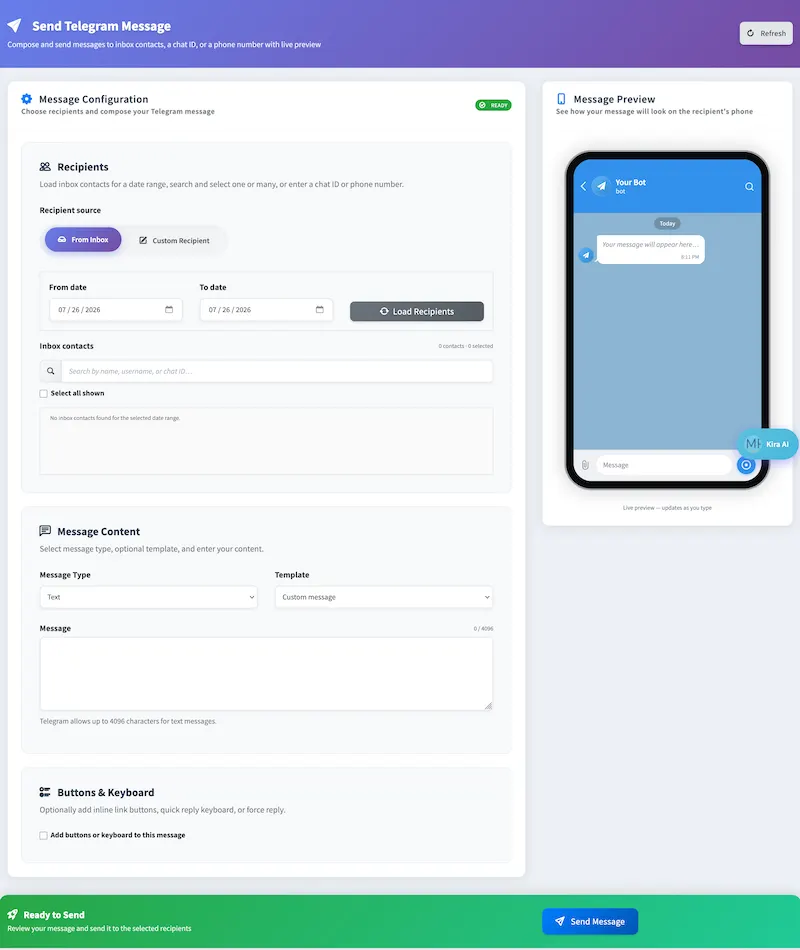
A walk through the actual Send Telegram Message screen in your SMPP Center panel - five steps from picking recipients to a delivered message.
Choose your recipients
Pick From Inbox to load contacts who've messaged your bot within a date range, then search and select one or many - or switch to Custom Recipient and enter a chat ID or phone number directly.
Write or pick your message
Choose a message type - text, photo, document, or video - start from a saved template, or write custom content. Telegram allows up to 4,096 characters per text message.
Add buttons, if you need them
Optionally attach inline link buttons, a quick-reply keyboard, or a force-reply prompt - useful when you want the message to drive a specific action.
Check the live preview
The panel renders your message inside an actual Telegram chat view as you type, so you see exactly what recipients will see before anything sends.
Send and track it
Hit Send Message to broadcast to every selected recipient, then check Delivery Reports for sent, delivered, and failed counts.
FAQ
Telegram messaging software - common questions
Client Feedback
What Our Clients Say
Our clients run regulated, high-volume messaging infrastructure and prefer not to be named publicly. These testimonials are shared with permission while keeping commercially sensitive details confidential.
We needed complete control over our messaging infrastructure instead of relying on a hosted provider. The platform has delivered excellent performance and reliability.
The migration was completed smoothly and the platform has remained stable under heavy production traffic. The flexibility of self-hosting was one of the biggest advantages for us.
The platform has been reliable for business-critical messaging. Multi-connection support and detailed logging have made daily operations much easier.
High throughput, intelligent routing, and detailed monitoring have significantly simplified our messaging operations.
Names and company details are withheld at our clients' request. This is common among telecom providers, SMS aggregators, fintech companies, and enterprises that consider their messaging infrastructure commercially sensitive.