
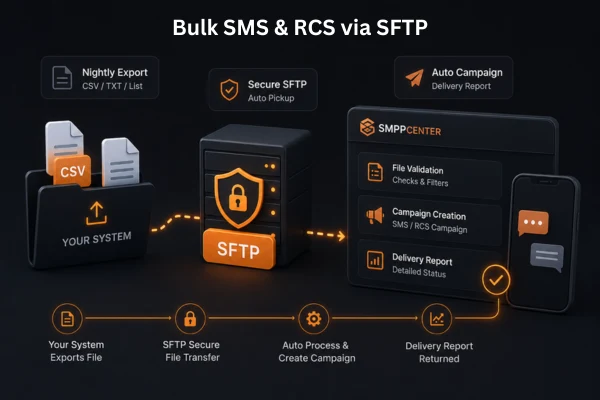
Turn Your Own File Drop Into a Campaign - Automatically
Your marketing or notification system already generates a file - a nightly export, a triggered list, a CSV your CRM produces on its own. Instead of building an API integration or uploading it by hand, you point that system at a secure SFTP location. SMPPCenter picks the file up, validates it, and pushes it into your account as an SMS or RCS campaign, with a delivery report handed back the same way once it's run.
How It Works
Drop the file
Your system dumps a CSV or XLS file - recipient numbers and message content, or a DLT-approved template reference - to a dedicated SFTP location, on the schedule that fits how your system already works: near real-time or a fixed pickup cadence.
Pick up, validate, queue
We pick the file up and validate it - recipient number format, DLT template match, sufficient account credits, and overall file structure. Anything that fails is rejected and reported back rather than sent or silently dropped.
Campaign runs, report returns
Validated records are pushed into your account as a campaign and sent. A delivery report is written back to your SFTP location - typically the next day - so your own system can pull it in the same way it dropped the file.
Built for Systems That Already Produce Files
Secure by Design
- IP-restricted access: only the IP addresses you authorize can connect to the SFTP location.
- Standard SFTP authentication: on top of the IP allowlist, so access is locked down at two layers.
- No credentials shared beyond what's needed: the connection is scoped to campaign file drop-off and report pickup.
Validated Before It Sends
- Recipient number format checked before anything is queued.
- DLT template match verified for regulated markets like India.
- Credit sufficiency confirmed against your account balance.
- File structure validated - malformed files are rejected, not partially processed.
Runs on Your Schedule
- Pickup cadence configured to match your requirement - near real-time or a fixed interval.
- No manual uploads and no one waiting on a dashboard to press send.
- Fits systems that already export files on their own schedule - CRMs, billing systems, legacy platforms.
SMS and RCS, Same Flow
- The same drop-and-pickup flow supports RCS campaigns alongside SMS.
- RCS sends carry the extra fields they need - agent and rich card template - in the same file.
- One integration, both channels - no separate pipeline for RCS.
Already generating a campaign file today?
Tell us how your system produces it - we'll set up the SFTP location, validation rules, and report format around it.
Talk to a SpecialistWho This Is For
Legacy & Regulated Systems
Banking, NBFC, and government systems that already export batch files on a schedule and can't easily be re-architected around a live API.
Marketing & Agency Teams
Campaign lists exported from a CRM or marketing platform, dropped straight into a send - no developer needed for every campaign.
Ops Teams Wanting Less Integration
Teams that want the reliability of an automated pipeline without building and maintaining an SMPP or REST API integration.
Prefer a Live Integration Instead?
SFTP file drop is one way in - if your system can call an API or hold an SMPP connection open, those paths work too. See SMPP Software Features for the full platform, or compare protocols in SMPP vs HTTP API.
FAQ
Frequently Asked Questions
Ready to automate your campaign uploads?
Talk to a SpecialistClient Feedback
What Our Clients Say
Our clients run regulated, high-volume messaging infrastructure and prefer not to be named publicly. These testimonials are shared with permission while keeping commercially sensitive details confidential.
High throughput, intelligent routing, and detailed monitoring have significantly simplified our messaging operations.
Excellent documentation, responsive technical support, and an enterprise-grade platform that scales as our business grows.
We needed complete control over our messaging infrastructure instead of relying on a hosted provider. The platform has delivered excellent performance and reliability.
The delivery reports and routing controls give us the visibility we were looking for. The system has integrated well with our internal applications.
Names and company details are withheld at our clients' request. This is common among telecom providers, SMS aggregators, fintech companies, and enterprises that consider their messaging infrastructure commercially sensitive.