What SMPPCenter’s MCP Server Integration actually exposes to Cursor, Claude, ChatGPT and other AI hosts, how the OAuth and PKCE authorization model works, and where this fits next to SMPP binds, the REST API, SFTP bulk drops and the AI Agent Builder.
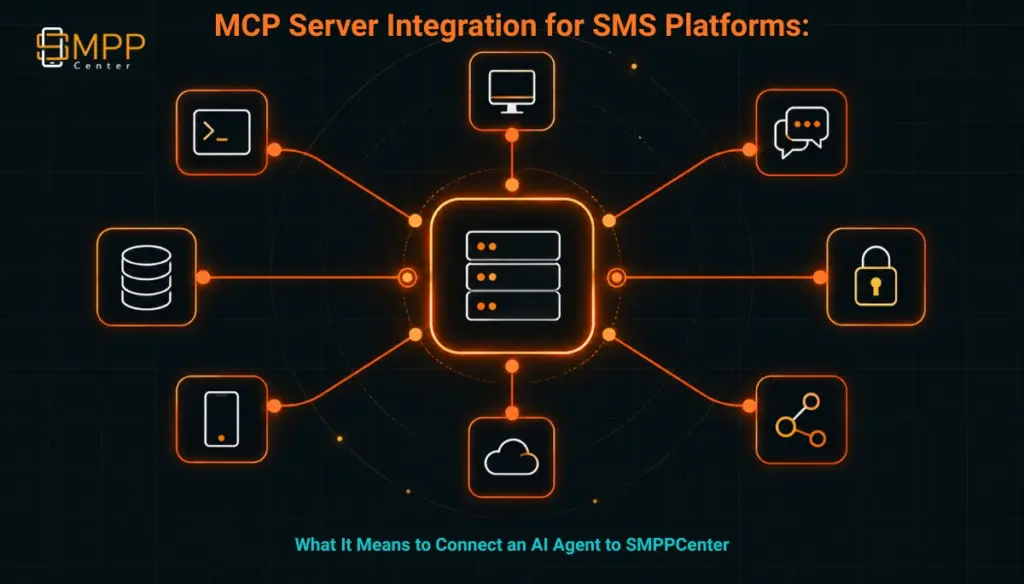
TABLE OF CONTENTS
- The Short Answer
- TL;DR
- What MCP Actually Is
- What SMPPCenter’s MCP Server Exposes
- Authorization: OAuth, PKCE and Audience Binding
- MCP Next to SMPP, REST, SFTP and Agent Builder
- Security Checklist Before You Turn It On
- Compliance Considerations for Regulated Traffic
- Reseller and Multi-Tenant Considerations
- What This Article Deliberately Does Not Claim
- Next Steps
- FAQs
The Short Answer
SMPPCenter offers a dedicated MCP Server Integration that lets an AI host such as Cursor, Claude Desktop or ChatGPT call a defined set of tools against a licensed SMPPCenter account: sending SMS, WhatsApp, RCS or Telegram messages, checking delivery reports and message status, checking wallet balance, and looking up templates with DLT compliance validation built in. Access runs through OAuth with PKCE, tokens are bound to the specific MCP server, and the platform’s existing credit, template and channel-license rules still apply to every call, whether it comes from a script, a panel click or an AI agent. It is billed as a chargeable add-on quoted per deployment, the same commercial pattern SMPPCenter uses for its SFTP bulk-file integration.
This is not the same product as SMPPCenter’s AI Agent Builder, which deploys a customer-facing conversational bot onto WhatsApp, RCS, SMS, Telegram and a web widget. MCP Server Integration runs in the other direction: it gives your own operators and developers a way to operate the platform from inside an AI tool, rather than giving the platform an AI-driven front end for your customers.
TL;DR
MCP, the Model Context Protocol, is an open standard that lets an AI application (the “host”) connect to external tools and data through a client-server exchange built on JSON-RPC 2.0. SMPPCenter has published a dedicated MCP Server Integration product page describing tool support for send_sms, send_whatsapp, send_rcs and send_telegram, plus get_dlr, get_message_status, get_balance and template lookup with DLT matching enforced. Remote access uses OAuth with PKCE, access tokens are scoped to the specific MCP server URI, and the platform supports connecting an existing identity provider (Okta, Azure AD, Keycloak, Auth0) or using the operator panel login itself as the consent screen. Local stdio-based MCP clients can inherit the operator’s existing session without a separate OAuth round trip, and machine credentials are available for CI or private-network use cases. Pricing is quoted per deployment rather than published as a flat rate, mirroring how SMPPCenter prices its SFTP bulk messaging integration. File-based bulk campaigns stay on that SFTP path; MCP is built for interactive, per-message tool calls, not batch drops. What is not publicly documented is the full JSON-RPC tool schema, per-tool rate limits, and which pricing tiers include MCP eligibility by default rather than by custom quote.
What MCP Actually Is
MCP is not an SMPPCenter invention. It is an open protocol, and understanding what it standardizes matters before evaluating any vendor’s implementation of it.
In MCP’s own architecture, three roles exist. An MCP host is the AI application itself, such as Claude Desktop, ChatGPT, or an IDE like Cursor. The host creates an MCP client for each server it connects to, and each client keeps a dedicated connection to its server. An MCP server is the program that exposes context and capabilities to those clients. According to the protocol’s architecture documentation, a server can expose three kinds of primitives: tools (executable actions, such as sending a message or querying a database), resources (data the AI can read for context), and prompts (reusable interaction templates). Everything runs over JSON-RPC 2.0, a lightweight remote-procedure-call format, and the protocol itself is stateless: every request carries the information the server needs to process it rather than depending on a remembered session.
Two transports matter for how a server actually connects. Stdio transport runs a server as a local process talking to a single client over standard input and output, with no network hop involved; this is how a locally installed MCP server typically works inside a desktop AI tool. Streamable HTTP transport is used for remote servers that many clients connect to over the network, and it is the transport that requires the OAuth-based authorization model discussed below.
None of this tells you anything about what a specific vendor’s server actually does. MCP defines the plumbing: how a host discovers tools, how it calls them, and how the connection is secured. What tools exist, what each one accepts and returns, and what business rules sit behind them is entirely up to the server operator. That is the part that has to be verified against SMPPCenter’s own published product page rather than assumed from the protocol name.
What SMPPCenter’s MCP Server Exposes
SMPPCenter’s MCP Server Integration page names a specific, bounded set of tools rather than a general-purpose API surface. As published, an MCP client connecting to a licensed account can call:
send_sms,send_whatsapp,send_rcs, andsend_telegramto originate a message on each respective channelget_dlrandget_message_statusto check delivery outcomesget_balanceto check the account’s wallet credit- a template lookup tool that validates DLT compliance before a template can be used
That is a narrower surface than SMPPCenter’s full feature set, and it is worth being precise about that boundary. This is a tool-calling interface built for an AI host to perform a specific set of operator actions, not a general remote-control panel for every account setting. The page states that DLT template mismatches are rejected rather than silently corrected, that expired tokens, missing scopes, and insufficient wallet credit all produce errors instead of being worked around, and that credentials and channel licenses never leave SMPPCenter’s own systems during a call. In practice, that means an AI agent calling send_sms through this integration is still subject to the same DLT template enforcement and credit checks that apply to a message sent through the panel or the REST API; the AI host is a new front door, not a new set of rules.
Authorization: OAuth, PKCE and Audience Binding
The authorization model is where MCP as a protocol and SMPPCenter’s specific implementation line up closely, because SMPPCenter’s page describes an implementation that follows the MCP authorization specification rather than inventing its own scheme.
For remote HTTP-based MCP clients, SMPPCenter’s integration uses OAuth with PKCE (Proof Key for Code Exchange, using the S256 method). PKCE matters here because it closes a specific attack: without it, an attacker who intercepts an authorization code in transit could redeem it for an access token themselves. PKCE requires the client to generate a secret verifier before starting the authorization request and present it again when exchanging the code, so a stolen code alone is useless. This is not a novel idea SMPPCenter designed; it is a standard OAuth 2.1 mitigation that the MCP specification requires clients to implement for exactly this reason.
The second piece worth understanding is audience binding. SMPPCenter states that an issued access token is scoped to that specific MCP server URI. This maps to what RFC 8707 calls a resource indicator: the token request includes a resource parameter identifying which server the token is meant for, and a compliant server must reject a token that was issued for somewhere else. The practical benefit for a buyer evaluating this is straightforward: a token leaked from, or stolen out of, a different AI tool or a different vendor’s MCP server cannot be replayed against your SMPPCenter account, because the token was never valid for that resource in the first place. The MCP specification is explicit that servers accepting tokens without this audience check, or forwarding client tokens on to a downstream service unmodified, create exactly the kind of “confused deputy” vulnerability this design is meant to prevent.
On the identity side, SMPPCenter’s integration supports wiring into an identity provider you already run, including Okta, Azure AD, Keycloak or Auth0, so that access maps to your existing Admin, reseller or user accounts rather than a separate credential set created just for AI tools. If you do not run one of those, the operator panel login itself can serve as the consent screen. For local, stdio-based MCP clients, which by protocol design are not expected to run the OAuth flow at all, the integration lets the client inherit the operator’s existing session instead. Optional machine credentials exist for CI pipelines or private-network use cases where no human is present to complete an interactive consent step. Refresh tokens rotate, which limits how long a compromised refresh token stays useful.
None of this replaces a security review. It describes what the mechanism is built to prevent, not a guarantee that every deployment configuration is safe by default; that still depends on how you configure scopes, which identity provider you point at it, and who gets issued credentials.
MCP Next to SMPP, REST, SFTP and Agent Builder
SMPPCenter now has five distinct ways for something outside the platform to originate a message or pull a status, and it is easy to conflate them because they overlap in what they ultimately do. They do not overlap in who initiates the call or what kind of caller they are built for.
| Integration path | Who initiates the connection | Typical caller | Data format | Best fit |
|---|---|---|---|---|
| SMPP bind (transceiver, transmitter, receiver) | Your messaging application | High-throughput backend systems | Binary SMPP PDUs | Aggregators pushing sustained volume at TPS limits |
| REST/HTTP API | Your application code | Custom scripts, CRMs, backend services | JSON over HTTPS | Standard programmatic integration |
| SFTP bulk file drop | Your file-generation system | Batch jobs, systems without API development capacity | CSV, XLS, XLSX, TXT, ZIP | Large scheduled or one-off campaigns, detailed in SMPPCenter’s SFTP bulk messaging integration |
| AI Agent Builder | An SMPPCenter-hosted conversational agent | Your end customers messaging your brand | Chat turns on WhatsApp, RCS, SMS, Telegram, web widget | Customer-facing bots, described on the AI Agent Builder page |
| MCP Server Integration | An external AI host (Cursor, Claude Desktop, ChatGPT, or a custom MCP client) | Your own operators or developers working inside an AI tool | JSON-RPC 2.0 tool calls | Internal operations and development workflows run through an AI assistant |
The distinction that matters most for a buyer is the one between AI Agent Builder and MCP Server Integration, since both put an AI system next to the messaging platform but in opposite roles. AI Agent Builder puts SMPPCenter’s own hosted agent in front of your customers, answering on their behalf across channels from one configured bot. MCP Server Integration puts an AI host that you or your team already use, such as Claude Desktop or Cursor, on the operating side of the platform, letting that tool call send_sms or get_dlr the same way a script would. One is a product you deploy to your audience; the other is a tool-calling interface you give your own staff.
Security Checklist Before You Turn It On
Before requesting an MCP deployment quote, work through this with whoever owns identity and access management on your side, not just the messaging team:
- Confirm which identity provider will issue tokens for this integration, and whether it is one SMPPCenter’s page lists (Okta, Azure AD, Keycloak, Auth0) or your operator panel login as the consent screen
- Decide which accounts (Admin, reseller, or individual user) should be reachable through MCP, since tokens map to specific account identities rather than a shared service credential
- Confirm whether any local, stdio-based MCP client will be used, and if so, understand that it inherits the operator’s existing session rather than running a separate OAuth flow
- Set an internal policy on machine credentials for CI or private-network use, including who can issue and revoke them
- Walk through what happens on token expiry, insufficient wallet credit, and a DLT template mismatch, and confirm your operations team knows these surface as errors rather than silent retries or substitutions
- Decide whether MCP-originated sends should be visually distinguishable in your reporting or audit trail from sends originated by the panel, REST API, or SFTP
- Request the specific tool catalogue, scopes, and redirect URI configuration in writing as part of the deployment quote, since none of that is published at a fixed specification
Compliance Considerations for Regulated Traffic
For traffic subject to India’s DLT framework or to a bank’s own messaging governance under RBI guidance, the relevant question is not whether MCP introduces a new compliance regime. It does not. The template lookup tool SMPPCenter exposes through MCP validates DLT compliance before a template can be used, and the page states that a mismatch is rejected rather than corrected on the fly. That is the same enforcement point that applies to sends made through the panel or the REST API; MCP does not create a side door around it.
What does change is who or what can trigger a send, and that has audit implications separate from DLT enforcement itself. An AI agent acting on a loosely worded instruction, or acting on a misread of ambiguous context, can call send_sms just as a script can. For promotional traffic subject to India’s NCPR and DND scrubbing, or for DPDP-relevant customer communications, the controls that matter are the same ones that apply to any other automated sender: rate limits, template pre-approval, and a clear owner for the credential the AI host authenticates as. Treat an MCP-connected AI host the same way you would treat a new backend service with send permissions, because from the platform’s perspective, that is functionally what it is.
Reseller and Multi-Tenant Considerations
SMPPCenter’s page states that resellers can offer isolated MCP endpoints to their downline users, which extends the same multi-tenant pattern already used for the platform’s reseller accounts and the Reseller API category into the MCP layer. For a reseller operation, that raises the same question that applies to any credential you hand a downline customer: whether that customer’s MCP access is scoped tightly enough that a misconfigured or overly permissive AI host on their end cannot touch another customer’s balance, templates, or send history.
If you run a white-label operation built around SMPPCenter’s reseller tooling, the choice of identity provider becomes a per-tenant decision rather than a single organizational one. Each downline account connecting its own AI host needs its own token audience and its own credential lifecycle, not a shared one inherited from the parent reseller account.
What This Article Deliberately Does Not Claim
SMPPCenter’s MCP Server Integration page names four channel-send tools, two status-check tools, a balance-check tool, and a template lookup tool, but it does not publish the full JSON-RPC tool schema, including exact input parameters, return object structure, or error codes for each tool. That level of detail is consistent with how SMPPCenter treats its broader API surface: functional detail is shown inside the application to a logged-in customer on their own domain, not published as a global reference.
Separately unconfirmed: per-tool rate limits or throttling behavior specific to MCP-originated calls (as distinct from the platform’s general 10 TPS default client throughput and ESME_RTHROTTLED behavior on SMPP binds); which pricing tiers include MCP eligibility versus requiring a custom quote regardless of tier; whether MCP-originated messages appear with any distinct marker in delivery reports or billing exports; and audit-log retention specifics for actions taken through an MCP-connected AI host. None of these are stated on the MCP page or the pricing page as of this review, and none should be assumed either way when scoping a deployment.
Next Steps
If your team already relies on Cursor, Claude Desktop, or ChatGPT for day-to-day development or operations work, MCP Server Integration is worth scoping as a quoted add-on rather than assuming it is bundled with your current plan. Review the MCP Server Integration page for the current tool catalogue, then check SMPPCenter’s pricing or talk to the team through Why Us to get a deployment quote scoped to your identity provider, your channel licenses, and which accounts should be reachable through it.
FAQs
Is MCP Server Integration the same as SMPPCenter’s REST API?
No. The REST API is a general programmatic integration path for your own application code. MCP Server Integration exposes a narrower, named set of tools specifically for AI hosts like Cursor, Claude Desktop, or ChatGPT to call, using JSON-RPC 2.0 rather than a typical REST request/response pattern.
Does an AI agent connected through MCP bypass DLT template checks?
No. SMPPCenter’s page states that DLT template mismatches are rejected through the same template lookup tool that enforces compliance for other send paths. A mismatch produces an error rather than a substitution or an override.
Can we require our own single sign-on for MCP access instead of a separate login?
Yes, based on what SMPPCenter publishes. The integration supports connecting to an existing identity provider, including Okta, Azure AD, Keycloak, or Auth0, so access can map to accounts you already manage rather than a new credential set.
Do we still need API keys once OAuth is configured?
For remote HTTP-based MCP clients, OAuth with PKCE is the described access model rather than a static API key. For local, stdio-based MCP clients, the integration allows inheriting the operator’s existing session instead of running a separate OAuth exchange, and optional machine credentials exist for CI or private-network scenarios.
Is MCP Server Integration included in every SMPPCenter plan?
Not automatically. It is described as a chargeable add-on quoted per deployment, following the same custom-quote pattern SMPPCenter uses for SFTP bulk messaging, rather than a flat feature switch included in a specific tier.
Can a reseller give its downline customers their own MCP access?
SMPPCenter’s page states that resellers can offer isolated MCP endpoints to downline users. Scoping each downline customer’s identity provider and token audience separately is worth confirming during setup so one customer’s AI host cannot reach another customer’s data.
Recent Articles
- Message Encryption, IP Whitelisting and VPN Protection: The SMS Security Layer Most Platforms Skip
- Reseller Architecture Explained: How Multi-Tenant SMPP Platforms Actually Work
- RCS Business Messaging: What It Requires Beyond an SMPP Connection
- Migrating From Jasmin SMS Gateway to a Licensed SMPP Platform
- Migrating From Kannel to a Licensed SMPP Platform: A Practical Runbook