
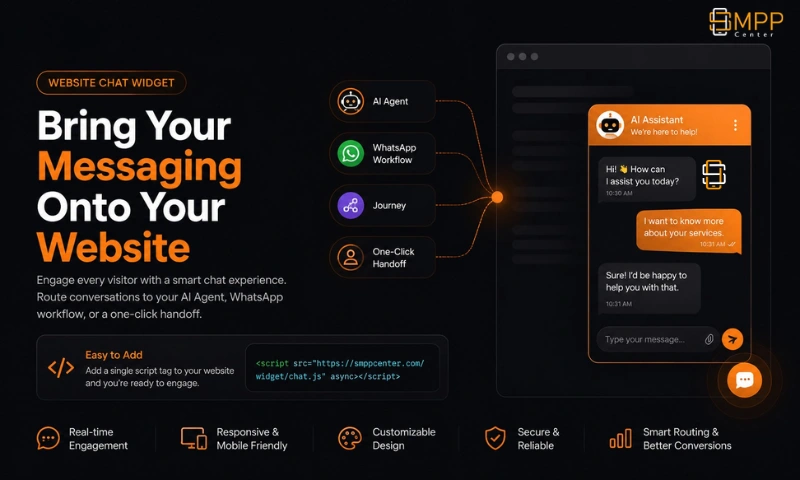
Bring Your Messaging Onto Your Website
You've already built an AI agent or a WhatsApp automation - the Website Chat Widget is how it meets visitors who never open WhatsApp or type a phone number. Paste one script tag on your site, choose a layout and brand it to match, and route every conversation to your AI agent, a WhatsApp workflow or journey, or a one-click WhatsApp handoff.
Three Steps to a Live Widget
1. Choose a layout & brand it
Pick from 7 layouts - floating bubble, bottom-right chat, full-page chat, embedded widget, help center, popup, or a dedicated contact form - then apply one of 9 built-in themes or fully customize colors, fonts, logo, and avatars.
2. Set where it routes
Point the widget at a published AI agent, a WhatsApp automation or journey, or a direct WhatsApp click-to-chat handoff - one routing target per widget, changeable anytime.
3. Paste one script tag
Add the auto-generated snippet before your closing </body> - works on WordPress, Shopify, Wix, or any custom-built site. No plugin install, no iframe to wrestle with.
Built for More Than a Generic Chat Bubble
Genuinely Brandable
- 9 built-in themes, or full custom control over brand color, gradient, fonts, and border radius.
- Upload your own logo, choose launcher and header styles, and set bot/user avatars and display names.
- A custom CSS field for the details a settings panel can't cover.
Smart Routing
- Route to a published AI Agent Builder bot, complete with its own knowledge base and guardrails.
- Or route to a WhatsApp automation/journey, or a direct WhatsApp click-to-chat handoff with a prefilled message.
Lead Capture Built In
- Optional pre-chat form collects name and email before the conversation starts, with a guest option.
- The Contact Widget layout collects name, email, phone, and message directly.
- Leads are tracked as their own metric in your analytics.
Proactive, Not Just Reactive
- Auto-open the widget after a delay, a scroll-depth threshold, time on page, or a specific URL match.
- A launcher "attention" nudge - pulse, bounce, shake, or a tooltip bubble - draws the eye without being intrusive.
Scheduled Visibility
- Run 24/7, set a single business-hours window, or configure rules matched to each visitor's own timezone.
- A maintenance mode shows a custom message and pauses new conversations when you need it to.
Locked Down by Default
- Each widget is restricted to an allowlist of domains - it simply won't load anywhere else.
- Bot-traffic detection, scam-content pattern blocking, per-minute rate limiting, and optional profanity filtering and PII masking.
The Details Visitors Notice
Voice Conversations
Visitors can speak instead of type, with spoken replies read back in a configurable voice and language.
File Sharing
Visitors can attach files directly in the chat when a conversation needs more than text.
Emoji & Quick Replies
A built-in emoji picker and suggested questions/quick replies keep conversations moving.
CSAT Feedback
A simple thumbs up/down at the end of a conversation feeds straight into your satisfaction metrics.
Running multiple sites or client brands?
Create a separate widget per site - its own branding, domain allowlist, and routing - all from one account.
Talk to a SpecialistKnow Exactly What's Working
Per-widget analytics track visitors, chats started, conversations resolved vs. escalated, average response and resolution time, leads captured, and CSAT - with browser, device, and page-level breakdowns, so you can see which pages and which widgets are actually converting.
What this is - and isn't
This is not a live human-agent help desk. There's no agent inbox or reply console inside the widget itself. Every conversation is routed to your AI agent, a WhatsApp automation or journey, or handed off to a real WhatsApp conversation with a click-to-chat link if you want a human in the loop. If that's exactly what you need - an AI or automation-first widget rather than a staffed live-chat seat - this is built for it.
FAQ
Frequently Asked Questions
Ready to put your AI agent on your website?
Talk to a SpecialistClient Feedback
What Our Clients Say
Our clients run regulated, high-volume messaging infrastructure and prefer not to be named publicly. These testimonials are shared with permission while keeping commercially sensitive details confidential.
High throughput, intelligent routing, and detailed monitoring have significantly simplified our messaging operations.
We evaluated several messaging platforms before selecting SMPP Center. The deployment flexibility and API capabilities matched our enterprise requirements.
The migration was completed smoothly and the platform has remained stable under heavy production traffic. The flexibility of self-hosting was one of the biggest advantages for us.
The delivery reports and routing controls give us the visibility we were looking for. The system has integrated well with our internal applications.
Names and company details are withheld at our clients' request. This is common among telecom providers, SMS aggregators, fintech companies, and enterprises that consider their messaging infrastructure commercially sensitive.