SMPP Center’s User Dashboard now starts with an all-channel overview, then opens detailed analytics for SMS, WhatsApp, RCS, Voice, Two-way, and Telegram.
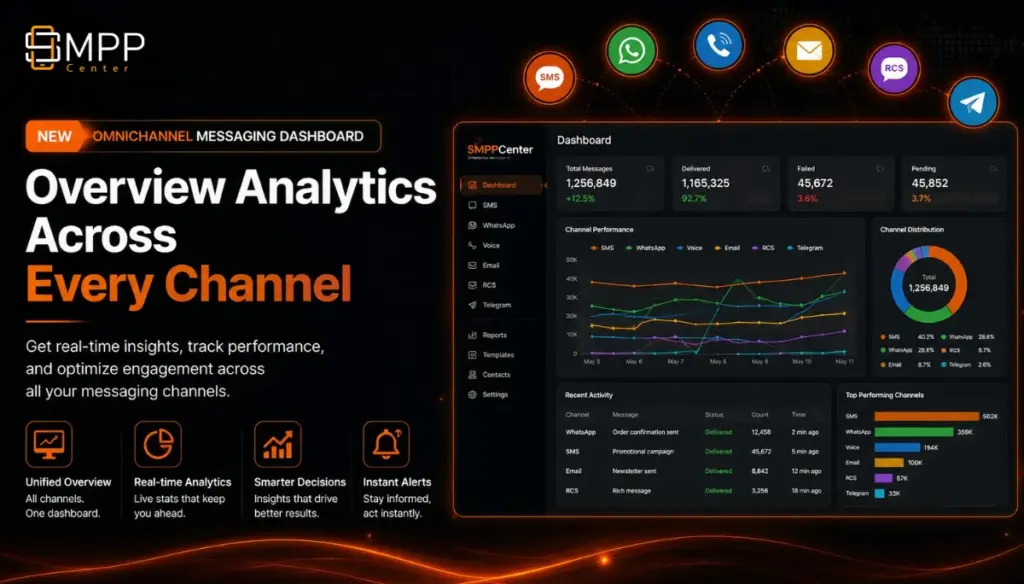
Licensed and rented SMPP Center customers now get a redesigned User Dashboard built for operators who run more than one messaging product.
Instead of jumping between reports, you start on a single Overview, then open individual product tabs when you need channel-level detail.
What’s new
- All-channel Overview first
See submissions, delivered, failed, and needs-attention across every enabled channel. Filter by Today, Yesterday, Weekly, or Monthly. - Channel cards for every product
Open metrics for:- SMS
- RCS
- Voice
- Two-way SMS
- Telegram Chat
- Deeper analytics inside each product tab
Each channel view includes delivery health, today’s status mix, live insights (delivery rate and failure rate), plus the modern chart and report cards operators already use for trends and usage. - Faster day-to-day monitoring
Interactive reports with clearer charts, sticky headers, search and sort, and defaults that focus on today and the last 7 days where it matters most.
Why it matters
Aggregators, resellers, and enterprise users can answer “How is traffic doing across SMS, WhatsApp, RCS, Voice, Two-way, and Telegram?” from one screen, then drill into the channel that needs attention.
How to try it
- Sign in to your SMPP Center panel.
- Open Dashboard.
- Review the Overview summary and channel cards.
- Select a product tab (SMS, WhatsApp, RCS, Voice, Two-way, or Telegram) for detailed health, status mix, insights, and graphs.
If you need help enabling a channel or reading the new insights, contact your account team or support from the panel.
Found this useful?Add as Preferred Source on Google