If you’ve turned on a CRM connector, an e-commerce plugin, and a spreadsheet connector on the same SMPP Center account, they don’t run in separate lanes. They share one wallet, one delivery-report stream, and one TPS cap. Here’s what that actually means operationally, and how to stop the same contact from getting hit three times in an hour.
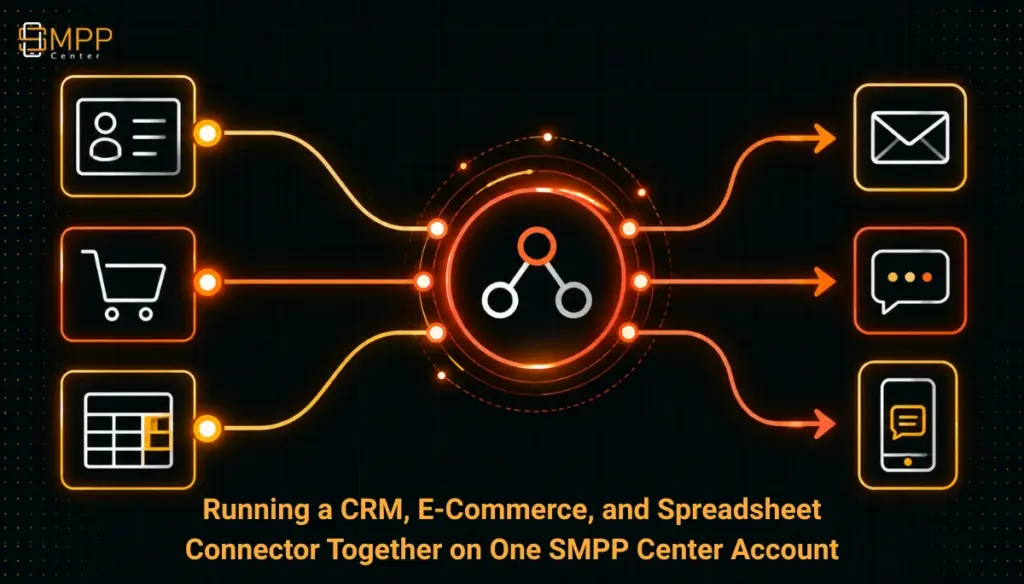
Table of Contents
- The Short Answer
- TL;DR
- What’s Actually Shared vs Independent
- The Account-Level TPS Problem
- The Overlap Problem Nobody Mentions
- A Practical Sequencing and Dedup Approach
- Deciding Who Wins When Two Connectors Fire
- Setting It Up Without Surprises
- Next Steps
- FAQs
The Short Answer
Yes, you can run a CRM connector, an e-commerce plugin, and a spreadsheet connector on the same SMPP Center account at the same time. Each one operates its own trigger and its own automation independently, so pausing or deleting one doesn’t touch the others. But they’re not actually separate lanes. They draw from the same credit ledger, show up in the same delivery reports, and compete for the same account-level throughput cap, which defaults to 10 TPS unless you’ve bought a higher pricing tier. None of them know the other two exist, so if the same person is a CRM lead, a Shopify customer, and a row in your marketing spreadsheet, you can end up sending them three messages inside the same hour with nothing in the platform stopping it.
TL;DR
- Credits, delivery reports, and compliance workflows (DLT, sender ID, template approval) are shared across every connector on the account. There’s no per-connector wallet.
- Throughput is shared too. Your account’s TPS ceiling, whatever tier you’re on, is a single number that every connector’s sends draw against, not three separate allowances.
- Each connector’s automation logic runs blind to the other connectors. There’s no cross-connector dedup, no shared suppression list, and no built-in sequencing if two triggers fire for the same contact close together.
- The fix isn’t a platform feature, it’s an operating discipline: pick one system as the source of truth per use case, normalize how you match a contact across systems (usually phone number), and decide ahead of time which connector wins when two would fire for the same person.
- Polling cadence across the CRM, e-commerce, and spreadsheet connectors all land in roughly the same one-minute window, which is actually helpful: it means overlapping triggers tend to show up close together in time, making them easier to catch in a review pass rather than scattered unpredictably.
What’s Actually Shared vs Independent
Worth separating these clearly, because the connector documentation covers each plugin on its own and never puts them side by side.
What’s shared across every connector on the account:
- Credits and billing. The Salesforce connector plugin page states usage runs on “the same delivery reports and credit ledger as other channels,” and the Airtable connector page says the same thing almost word for word. There’s one wallet. A burst of CRM-triggered sends and a flash-sale e-commerce campaign are both just withdrawals from the same balance.
- Delivery reporting. Everything lands in one reporting stream, regardless of which connector originated the send. You won’t find a separate dashboard for “messages the spreadsheet connector sent” versus “messages the CRM connector sent” unless you build that filter yourself from the message log.
- Compliance workflow. DLT template registration, sender ID, and approval status are account-level, not connector-level. A template approved for one connector’s use case is available to any of them, which is convenient, but it also means a compliance mistake in one connector’s templates affects the account as a whole.
- Per-account channel flags. Resellers (and some account tiers) can enable or disable Send SMS, Send WhatsApp, Send Voice, and Send RCS at the account level. Those flags apply regardless of which connector is trying to use the channel.
What’s independent per connector:
- The trigger itself. A new Salesforce lead, a new WooCommerce order, and a new row in a Google Sheet are three unrelated events. Nothing links them.
- Pause and delete. You can turn off the e-commerce connector without affecting the CRM or spreadsheet automations. Each one is its own object with its own on/off switch.
- Field mapping and templates assigned to that automation. Each connector has its own placeholder syntax and its own template selection, even when two connectors end up sending a structurally similar message (a welcome text, say) to the same person.
The practical consequence: anything about capacity is pooled, and anything about logic is siloed. That split is exactly where the operational risk sits.
The Account-Level TPS Problem
The platform’s default throughput for an SMPP client account is 10 transactions per second, confirmed on the throttling KB page, with over-limit submissions rejected at the protocol level (ESME_RTHROTTLED, error code 0x00000058). Higher pricing tiers raise that ceiling, but it’s still one number per account, not one number per connector.
That matters once you have three automations capable of firing sends independently. A CRM connector polls roughly once a minute and could release a batch of new-lead welcome texts. An e-commerce connector reacting to webhooks can fire the instant an order status changes, potentially several at once during a sale. A spreadsheet connector picks up new rows on its own one-minute cycle and might release a bulk upload of fifty contacts at the top of the hour. None of these connectors are aware of what the others are doing, and none of them negotiate for TPS headroom. They just submit, and the account-level throttle either accepts or rejects.
If you’re on a 10 TPS account and your spreadsheet connector releases a batch of 300 rows at the same moment your e-commerce connector is processing a wave of abandoned-cart reminders, you’ll see ESME_RTHROTTLED rejections, and whichever connector’s retry logic is weaker will lose messages or fall behind quietly. That’s a capacity planning problem, not a bug, and it’s not something either connector’s documentation flags, since each one was written as if it were the only automation running.
Practical budgeting: think of your account’s TPS ceiling as a shared resource you’re allocating across use cases, not a number you only check once against your busiest single connector. If your e-commerce traffic genuinely needs headroom during sales, size your tier for the combined peak, not any one connector’s typical load.
The Overlap Problem Nobody Mentions
This is the part that actually costs you reputation with recipients, more than the TPS math does.
Say a customer places an order (e-commerce connector sends an order confirmation), is also a lead record in your CRM from an earlier inquiry (CRM connector sends a follow-up nudge), and happens to be a row in a spreadsheet your sales team maintains for a separate outreach campaign (spreadsheet connector sends a promo). None of these three systems know the other two exist. There’s no shared suppression list, no “this phone number already got a message in the last hour” check, and no dedup logic anywhere in the stack. Each connector just does its job correctly, in isolation, and the recipient gets three unrelated texts in quick succession.
This is a straightforward identity-resolution problem, the same one CRM-to-CRM sync tooling has dealt with for years, just applied to messaging instead of record merging. The core idea carries over cleanly: match on a durable, normalized identifier (phone number in E.164 format is the obvious one here, since every connector eventually resolves to a phone number anyway), not on name fields, which are unreliable for matching. Decide, before you connect a second or third automation, what counts as “the same person” across systems, and build that check once rather than hoping it never comes up.
A Practical Sequencing and Dedup Approach
None of this needs to be elaborate. A few concrete habits cover most of the real risk:
- Normalize the match key. Whatever triggers a send, resolve the contact to a phone number in E.164 format before anything else happens. If your CRM stores numbers one way, your e-commerce platform another, and your spreadsheet a third, that inconsistency is where duplicate sends hide.
- Keep a shared suppression window outside the platform. Since there’s no built-in cross-connector suppression, the simplest fix is a small external log (even a spreadsheet or a database table you control) recording the last send time per phone number. Before a connector fires, check whether that number was messaged in, say, the last 30 to 60 minutes by any source, not just this connector.
- Clean each source system on its own first. Duplicate records inside a single CRM or e-commerce platform will just become duplicate sends once connected. Fix that before adding a second connector, not after.
- Pick a source of truth per use case, not per system. Transactional messages (order confirmations, OTPs) should always come from the e-commerce or transactional path, never from a CRM or spreadsheet automation, even if the same contact exists in both. Marketing and nurture sequences should have one designated owner system, with the others excluded from that use case entirely.
- Log the connector origin on every send. If your own suppression layer records which connector triggered each message, you can audit overlap after the fact even if you didn’t catch it in advance, and you can see which pairings actually collide in practice versus which ones are theoretical.
- Scan on a schedule, not just once. A daily check across the last 24 hours of sends, looking for the same phone number touched by more than one connector, catches most real collisions early enough to adjust before it becomes a pattern.
None of this is SMPP Center functionality. It’s an operating layer you build around the platform, and it’s the same discipline that CRM-to-CRM sync tooling recommends for deduplicating records: normalize first, define identity rules before you connect anything, and validate on a sample before trusting it at volume.
Deciding Who Wins When Two Connectors Fire
When two automations are genuinely capable of firing for the same contact around the same time, decide the priority order ahead of time rather than discovering it live. A reasonable default:
| Scenario | Priority | Why |
|---|---|---|
| Transactional e-commerce event (order, shipping, refund) vs. CRM nurture message | E-commerce wins, CRM nurture suppressed for that contact for a short window | Transactional messages are time-sensitive and expected; a nurture text landing right after an order confirmation reads as noise |
| CRM new-lead welcome vs. spreadsheet campaign row for the same contact | Whichever system is the designated source of truth for that use case wins outright | Having two systems both claim ownership of “new lead outreach” is the actual bug; fix the ownership, not the collision |
| Spreadsheet bulk upload vs. e-commerce abandoned-cart reminder | Stagger by time, don’t suppress either | Both are legitimate and not mutually exclusive, but firing them in the same minute during a TPS crunch risks throttling either one |
The table is a starting point, not a rule that fits every business. The underlying principle is the one that matters: decide collision priority at design time, when you’re calm and can think it through, not at 2am when a retry queue is backing up.
Setting It Up Without Surprises
- Confirm which pricing tier’s TPS ceiling you’re actually on, and whether it was sized for your busiest single connector or your combined peak across all of them
- Decide, in writing, which system owns which messaging use case (transactional, lead nurture, promotional) before enabling a second or third connector
- Normalize phone number format across every source system you’ll connect, before connecting the second one
- Build or assign a simple external suppression log keyed on phone number, independent of any single connector
- Set a collision priority order for the use cases most likely to overlap in your business
- Clean duplicate records inside each source system first, rather than relying on the connectors to catch it
- Schedule a recurring check (daily is reasonable) for contacts touched by more than one connector in the same day
- Review delivery reports and credit usage as a combined total, not connector by connector, since that’s how the account actually bills and throttles
Next Steps
If you’re running (or about to run) more than one connector on the same account, the sizing question usually comes down to throughput, not features. Check the pricing page for the TPS ceiling at each tier before you add a third automation that’ll compete for the same cap, and if you’re not sure which tier actually covers your combined peak load, the why us page walks through how the platform’s architecture handles routing and failover under load. Sizing for the sum of your connectors, not just the busiest one, is the detail that prevents the throttling problem described above.
FAQs
Does each connector get its own TPS allowance?
No. The account has one throughput ceiling, and every connector’s sends draw against it. There’s no per-connector carve-out.
If I disable one connector, does it affect the others?
No. Each connector’s automation is its own object. Pausing or deleting the e-commerce connector, for example, doesn’t touch the CRM or spreadsheet automations, their field mappings, or their templates.
Is there a built-in way to stop the same contact getting messaged by two connectors at once?
Not currently published on any of the connector pages. You’d need to build that check yourself, typically as an external log keyed on a normalized phone number that each connector’s workflow checks against before sending, or that you reconcile against after the fact.
Do all three connector types use the same polling frequency?
The CRM connectors and the Magento 2 e-commerce connector both poll on a roughly one-minute cycle. The spreadsheet connectors (Google Sheets, Airtable) also poll about once a minute. WooCommerce is the exception, since it fires on native in-process hooks rather than polling, so it reacts closer to instantly. Shopify uses push webhooks rather than polling as well.
Does adding more connectors cost more, separately from the messaging credits?
Pricing for the connector/integration products themselves is separate from message credits, and is quoted per connector at setup. It doesn’t scale the account’s TPS ceiling; that’s governed by your pricing tier, not by how many connectors you’ve enabled.
Can I run a CRM connector and an e-commerce connector for the same contact list on purpose, as a backup?
You can, but without a shared suppression layer that’s effectively asking for duplicate sends rather than redundancy. If the goal is failover, it’s better to build that logic explicitly (only fire the backup connector if the primary one didn’t send) than to run both unconditionally and hope they rarely overlap.
Checkout other posts
SMPPCenter’s WhatsApp Business API: Airtel BSP, Templates, and the 2025 Pricing Shift Explained
SMPPCenter’s Default 10 TPS Limit, and How the Pricing Tiers Actually Raise It
DLT Registration in India: Principal Entity, Header, and Template, Explained
Excel vs Google Sheets vs Airtable for Bulk Messaging: Which Connector Fits
WooCommerce, Shopify, and Magento 2 SMS Plugins: How Each One Actually Triggers a Message