File-drop SMS integration removes the API dependency, but it does not remove the need for operational discipline. This is the runbook for running an SFTP-fed campaign pipeline without losing records, missing reports, or double-sending a batch.
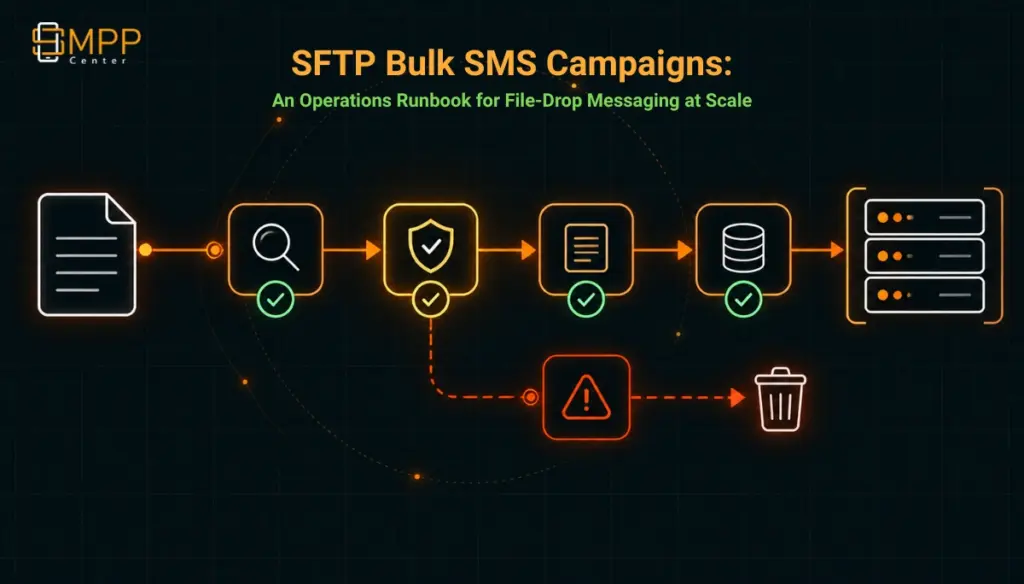
Table of Contents
- The Short Answer
- TL;DR
- Why File-Drop Still Needs a Runbook
- What the Pipeline Already Handles
- The Failure Modes Nobody Documents
- Setting Up the Pipeline Correctly
- Naming and Atomic Uploads
- Batch Sizing and Timing
- Monitoring and Alerting
- Idempotency and Retries
- The Compliance Step the File Validation Doesn’t Do
- SFTP vs API vs SMPP vs MCP
- Next Steps
- FAQs
The Short Answer
A file-drop SMS pipeline (export a CSV or XLS file to an SFTP location, get a campaign back) removes the need to build or maintain an API or SMPP integration, but it does not remove the need for operational discipline. The same failure classes that break API integrations (partial writes, duplicate submissions, silent validation failures, missing delivery confirmation) still exist in a file-based pipeline; they just show up differently, and nobody is paged for them by default because there is no application log to watch, only a folder. Running this reliably at scale means treating the SFTP drop like a production integration with its own checklist: atomic uploads, a naming convention that can’t collide, a defined batch size, a monitoring job that checks for the delivery report rather than waiting for one, and a clear owner for list hygiene before the file ever reaches the drop location, since NCPR/DND scrubbing belongs in the export job, not the platform’s validation step.documented file validation step.
TL;DR
File-drop SMS integration validates recipient number format, DLT template matching, account credit, and file structure before queuing a campaign, and returns a delivery report to the same SFTP location, typically the next day. Running it reliably at scale comes down to the sending side: an upload discipline (temp-name-then-rename, one file per timestamped batch, checksummed manifest), a defined batch size instead of an assumed one, a monitoring job that treats a late report as the alert condition rather than waiting on a push notification that doesn’t exist, and NCPR/DND scrubbing done before export, since the validation chain checks DLT template matching but not registry status.
Why File-Drop Still Needs a Runbook
File-drop integration exists for a specific reason: some systems, particularly in banking, government, and other regulated environments, export data on a schedule and were never built to hold an open API or SMPP session or call an SDK. Dropping a file into an SFTP location and picking up a report later fits how those systems already work, without a development project attached to it.
That framing is accurate, but it creates a quiet risk: because there’s no code to write, teams often treat the integration as “set it up once and forget it,” the same way they’d treat a nightly backup job. An API integration announces its failures loudly (an HTTP 500, an exception in a log, a failed test in CI). A file-drop integration fails quietly: a file that didn’t finish uploading before the platform tried to read it, a batch that got rejected for a structural reason nobody checked until a customer complained about missing messages, a report that landed in the wrong folder because two jobs share a naming pattern. The absence of a codebase doesn’t mean the absence of operational risk; it just moves the risk from “a bug in our integration” to “a gap in our process,” which is arguably harder to catch because there’s no stack trace pointing at it.
The rest of this piece is that missing process, section by section.
What the Pipeline Already Handles
It’s worth being precise about what the file-drop pipeline is already designed to catch before treating anything as a gap. The SFTP bulk messaging pipeline accepts a CSV or XLS export containing recipient numbers and message content, or a DLT-approved template reference, and validates four things before a file becomes a live campaign: recipient number format, DLT template match, sufficient account credit, and overall file structure. Records that fail any of those checks are rejected and reported back rather than silently dropped, which matters, since silent record-dropping is one of the most common complaints about legacy file-based integrations elsewhere in the industry.
Access is scoped by IP allowlisting on top of standard SFTP authentication, connections are limited to the campaign drop-off and report pickup function (not general file access), and pickup cadence is configurable to match near-real-time or a fixed interval rather than forcing a single schedule on every customer. A delivery report is written back to the same SFTP location, typically the next day, and the same drop-and-pickup flow supports RCS campaigns alongside SMS, using the same file structure with agent and rich card template fields added. Systems that can call a REST API or hold an SMPP connection open have that option too; the file-drop path exists specifically for systems that can’t or won’t build that.
That’s a reasonably complete validation-and-delivery loop for what it covers. What it doesn’t say anything about is a different problem than the pipeline being incomplete: some of it is genuinely the sending organization’s responsibility, not a missing vendor feature.
The Failure Modes Nobody Documents
Four failure classes matter for a production file-drop pipeline, and none of them are addressed in the published validation list:
Partial-file reads. If the pickup job scans the drop folder on a fixed interval and a large export is still mid-upload when that scan runs, a naive pickup process can read a truncated file. This is not specific to any one vendor’s pipeline; it’s a known class of race condition in any file-drop integration, well documented in general SFTP tooling guidance around atomic uploads.
Silent monitoring gaps. The report comes back “typically the next day,” but there’s no stated push notification, webhook, or alert tied specifically to that report’s arrival on the file-drop path. If it doesn’t show up, nothing tells anyone; someone has to notice its absence.
Undocumented batch limits. There’s no published ceiling on file size, record count per file, or files per pickup cycle. That’s not unusual for this kind of integration, but it means the sending organization has to define its own safe operating range rather than relying on a stated maximum.
None of these four gaps are a reason to avoid the file-drop model. Each has a straightforward, sending-side fix, covered next.
Setting Up the Pipeline Correctly
A workable setup sequence, in order:
- Separate the export job from the production write path. Generate the campaign file from a read replica or a scheduled export, not a live transactional table, so a slow export never blocks or gets blocked by application traffic.
- Land the file locally first, then checksum it. Write the complete file to local or staging storage before touching the SFTP connection, and compute a checksum (SHA-256 is sufficient) once the file is complete.
- Upload under a temporary name, then rename. This is the single most important step for avoiding partial-read failures, and it’s worth its own explanation.
- Drop a manifest alongside the file. A small companion file (or a header row) stating record count and checksum gives both sides something to reconcile against, even though the platform’s own validation doesn’t require one.
- Wait for the report on a schedule, not an assumption. Poll the report location on a fixed interval rather than assuming a fixed delivery time; “typically the next day” is a description of typical behavior, not a guaranteed SLA.
- Reconcile record counts. Compare the manifest’s record count and the report’s accepted-plus-rejected count before considering a batch closed. A mismatch, not a missing file, is often the first sign something went wrong upstream.
A pre-launch checklist for a new pipeline:
- Export job runs against a replica or scheduled snapshot, not the live write path
- File is checksummed locally before upload
- Upload uses a temp-name-then-rename pattern
- Filenames are unique per batch (timestamp plus sequence, never reused)
- A manifest or header row records expected count and checksum
- A polling job checks for the report on a defined schedule and alerts on absence, not just on error
- Record counts are reconciled between manifest and report before a batch is marked complete
- Recipient lists are scrubbed against NCPR/DND status before export, not assumed to be handled downstream
- SFTP credentials or keys are rotated on a defined schedule, not left static indefinitely
Naming and Atomic Uploads
The single highest-value fix here is also the oldest trick in file-transfer engineering: never upload a file under its final name. Upload it as campaign_2026-09-22_0001.csv.tmp, wait for the upload to complete, then issue a rename to campaign_2026-09-22_0001.csv. A rename on the same filesystem is atomic; a pickup process that only scans for files matching the final naming pattern will never see a partially written file, because the file doesn’t exist under that name until the write is finished. This exact pattern, upload under a temporary name and rename on completion, is standard guidance from file-transfer client documentation such as WinSCP’s own scripting guide for exactly this race condition, and it applies regardless of which platform sits on the receiving end.
Filenames should also be unique per batch and never reused. A timestamp-plus-sequence pattern (campaign_YYYY-MM-DD_NNNN.csv) avoids the ambiguity of a fixed filename like campaign.csv being overwritten mid-read, and gives the reconciliation step in the previous section something concrete to match a report against.
Batch Sizing and Timing
There’s no published maximum file size or record count for a single drop, which means the safe range has to be established empirically rather than looked up. A reasonable starting discipline: size batches so that a single file completes upload, validation, and queuing comfortably within one pickup cycle, and split larger exports into multiple sequentially numbered files rather than one very large one. This isn’t a workaround for a stated limit; it’s a precaution against an unstated one, and it also limits the blast radius of a single bad file, since a rejected batch of 5,000 records is a smaller problem than a rejected batch of 500,000.
It’s also worth being explicit about something the file-drop model can obscure: queuing a batch of any size doesn’t change the underlying account’s message throughput. Whatever transactions-per-second ceiling applies to the account still applies once the file’s records are queued for sending; a large file drop doesn’t bypass it, it just moves the wait into a queue rather than a blocked API call.
Monitoring and Alerting
Because there’s no stated push mechanism (webhook or notification) tied to the file-drop report specifically, the only reliable monitoring approach is to build the poll yourself: a scheduled job that checks the report location at an interval shorter than the expected turnaround, and alerts when a report is late relative to when the batch was submitted, not only when a report contains errors. “No news” is not “good news” in a file-drop pipeline; it’s an untested assumption until something checks for it.
A simple monitoring rule that covers most of the risk: alert if no report has arrived within a defined window after submission (start with double whatever the expected turnaround is, and tighten it once real timing data exists), and separately alert on any report whose accepted-record count doesn’t match the manifest’s expected count.
Idempotency and Retries
Retries are where file-based pipelines quietly create duplicate sends. If an upload appears to fail (a dropped connection, a timeout, an ops engineer who isn’t sure whether the first attempt completed) and the response is to simply re-run the export and re-upload, there is no documented mechanism confirming whether the platform treats the second file as a new campaign, a duplicate, or something reconciled against the first. Since that isn’t stated either way, the safe assumption for planning purposes is that it will be treated as a new batch.
The mitigation sits entirely on the sending side: never re-upload a file under a new name without first confirming, via the report or the reconciliation step, whether the original attempt actually landed. Where possible, include a batch identifier in the manifest or filename that a human (or a follow-up support conversation) can use to ask specifically whether a given batch was received, rather than guessing from silence.
The Compliance Step the File Validation Doesn’t Do
The documented file validation checks recipient number format, DLT template match, account credit, and file structure. It does not mention NCPR or DND registry status anywhere in that list. That’s a meaningful gap to plan around: it means recipient-list scrubbing against Do Not Disturb and National Customer Preference Register status has to happen before the file is exported, as part of the sending organization’s own list-hygiene process, not as something the file-drop pipeline checks on the way in.
This isn’t a criticism of the pipeline; DLT template matching and NCPR/DND scrubbing are two separate regulatory systems under India’s TCCCPR framework with separate enforcement mechanisms, and a file-validation step built around DLT compliance isn’t automatically also a DND scrubbing engine. It does mean that a team migrating from a system that scrubbed lists automatically at send time needs to explicitly relocate that scrubbing step into the export job feeding the SFTP drop, rather than assuming it happens somewhere downstream.
SFTP vs API vs SMPP vs MCP
| Dimension | SFTP file-drop | REST API | SMPP bind | MCP server |
|---|---|---|---|---|
| Best fit | Systems that export on a schedule, can’t hold a live connection | Systems with development capacity for request/response calls | High-throughput senders needing a persistent session | AI agents/assistants calling messaging as a tool |
| Real-time vs batch | Batch, cadence configurable | Near real-time, one call per message or batch payload | Real-time, persistent session | Real-time, per tool call |
| Development effort | None; file format and drop location only | Moderate; API client and error handling | Moderate to high; session/bind management | Low if an MCP-capable host is already in use |
| Delivery confirmation | Report file, typically next day | Webhook or polling, near real-time | DLR via bind session | Tool call response |
| Pricing basis (confirmed) | One-time integration fee, $700+ per channel | Included in platform/channel pricing | Included in platform/channel pricing | $20-50/month per exposed tool (“connector”) |
These figures reflect integration pricing as published; underlying channel and message costs are billed separately from the integration fee in every column. None of these paths are mutually exclusive; a reseller running an SFTP pipeline for one legacy client can run SMPP or API integrations for others on the same account.
Next Steps
Setting up a file-drop pipeline against these gaps takes an afternoon, not a development project: define the naming convention, wire the atomic-upload pattern into whatever export job already exists, and add a polling script that watches for the report rather than waiting on one. Current pricing and integration fees cover what the SFTP add-on costs on top of a plan; the why SMPP Center page covers the platform decision itself for teams still evaluating whether file-drop, API, or SMPP is the right starting integration.
FAQs {#}
Does the file-drop pipeline check recipient numbers against the Do Not Disturb or NCPR registry?
That isn’t stated as part of the documented validation, which covers recipient number format, DLT template matching, account credit, and file structure. List scrubbing for DND/NCPR status should happen in the export process before the file reaches the drop location.
What happens if the same file gets uploaded twice?
There’s no published statement on this either way. Treat it as an open question and avoid the situation entirely with unique, sequential filenames and a reconciliation step that confirms whether an earlier attempt landed before re-uploading.
How big can a single batch file be?
No maximum is published. A practical approach is to size batches so a single file completes validation and queuing within one pickup cycle, splitting larger exports into multiple sequentially numbered files rather than relying on an unstated ceiling.
Will queuing a very large file send messages faster than an API integration?
No. Queuing a batch doesn’t change the account’s underlying message throughput ceiling; a large file drop moves the wait into a queue rather than a blocked call, it doesn’t bypass the rate the account can actually send at.
Is there a way to get notified the moment a delivery report is ready, instead of checking for it?
Not documented for the file-drop path specifically. The reliable approach is a scheduled polling job on the report location rather than waiting for a push notification.
Can the same SFTP pipeline be used for RCS as well as SMS?
Yes. The same drop-and-pickup flow supports RCS campaigns using the same file structure, with agent and rich card template fields added for RCS-specific content.
Recent Articles
- Telegram Bulk Messaging for Business: What the Platform Actually Allows
- MCP Server Integration for SMS Platforms: Connecting an AI Agent to SMPPCenter
- Message Encryption, IP Whitelisting and VPN Protection: The SMS Security Layer Most Platforms Skip
- Reseller Architecture Explained: How Multi-Tenant SMPP Platforms Actually Work
- RCS Business Messaging: What It Requires Beyond an SMPP Connection