Licensed SMPP Center operators can now let resellers choose a Public Login Theme from White Label settings. On a pointed domain, that theme overrides the platform login look for login, signup, and password recovery.
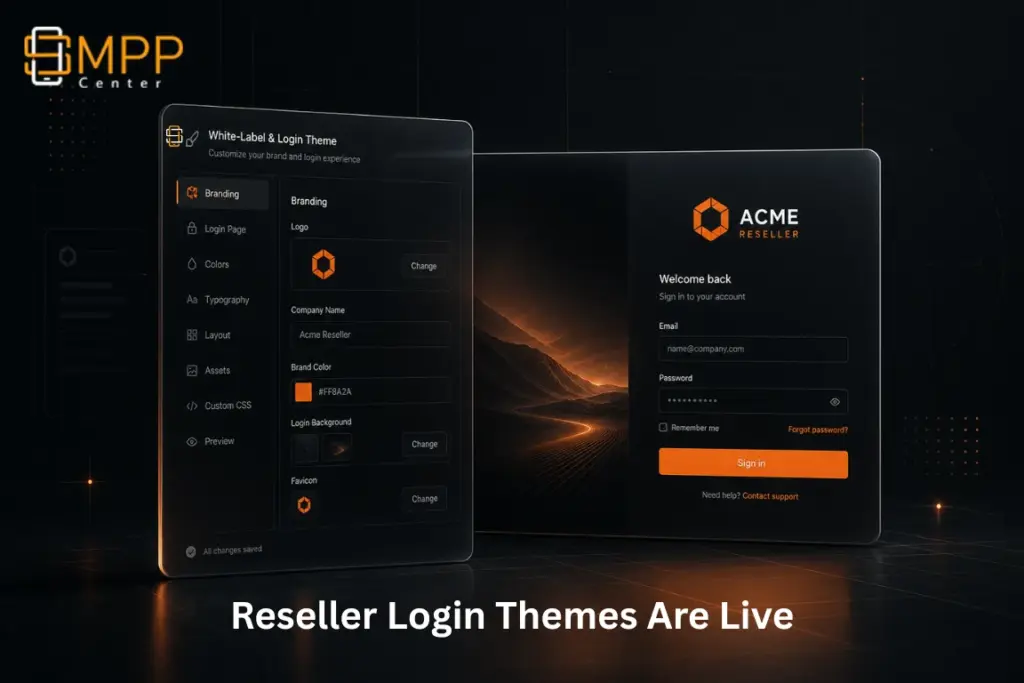
White-label messaging platforms win when every reseller feels like they own the product. Branding the panel is one part. Branding the first screen customers see, the login page on a pointed domain, is the part that seals trust.
SMPP Center now lets resellers choose a Public Login Theme from their Reseller Panel White Label settings. On their pointed domain, that choice becomes the live login experience. On the platform owner domain, your admin theme stays in control.
Why this matters for licensed operators
- Resellers stop asking support to “make my domain login look like my brand”
- Pointed-domain customers see the reseller’s layout, not a generic platform screen
- You keep a clean fallback: if a reseller has not set a theme, the platform login theme applies
- Theme packs stay governed by the public theme you activate (Default / Elite Admin)
What’s included
1. Public Login Theme inside White Label
Resellers open White Label settings and pick a Public Login Theme with visual previews. The help text is clear: the selected layout is used on their pointed domain; if unset, the platform setting is used.
2. Pointed-domain override, platform-safe fallback
- On a reseller pointed domain: reseller login theme wins when configured
- If no reseller theme is set: admin/platform public login theme is used
- Platform owner domain remains under owner/admin control
3. Theme options that match your active pack
- Available for Default and Elite Admin packs
- On Elite Admin, resellers see Default and Modern only (style1/2/3 stay hidden so they cannot pick incompatible layouts)
4. Modern (Full Width) login experience
Elite Admin now supports the Modern full-width login layout across:
- Login
- Signup
- Forgot password
- Reset password
- Including agent pages
That gives resellers a premium first impression without custom CSS work.
5. Safer activation behavior for license holders
When you activate a public theme pack, the platform login theme resets to that pack’s default, with a clear warning that reseller login themes may be affected. The front end also falls back safely if a reseller previously saved an incompatible option.
Where resellers find it
Reseller Panel → White Label → Public Login Theme
Pick a preview card, save, then open their pointed domain login page to verify.
What to tell your resellers
- Point their domain first and finish core White Label branding
- Choose Public Login Theme from the preview cards
- Test login, signup, and forgot-password on the pointed domain
- If they leave the theme unset, your platform login theme continues to apply
Bottom line
Your resellers can now own the login experience on their pointed domains, with preview-based theme selection and safe platform fallbacks. That is stronger white-label credibility for them, and fewer branding tickets for your support team.
If you are already on the latest SMPP Center release, this is available in reseller White Label settings for supported public theme packs. Need rollout help for your license? Talk to our team and we will walk you through it.
Our Recent Articles:
- Reseller Send Email Is Live: Let Your Resellers Notify Their Downline From Their Own Panel
- API Signatures: Let Your Customers Keep Their API While You Host the SMS Platform
- Empower Your Customers with Advanced Device Security Management