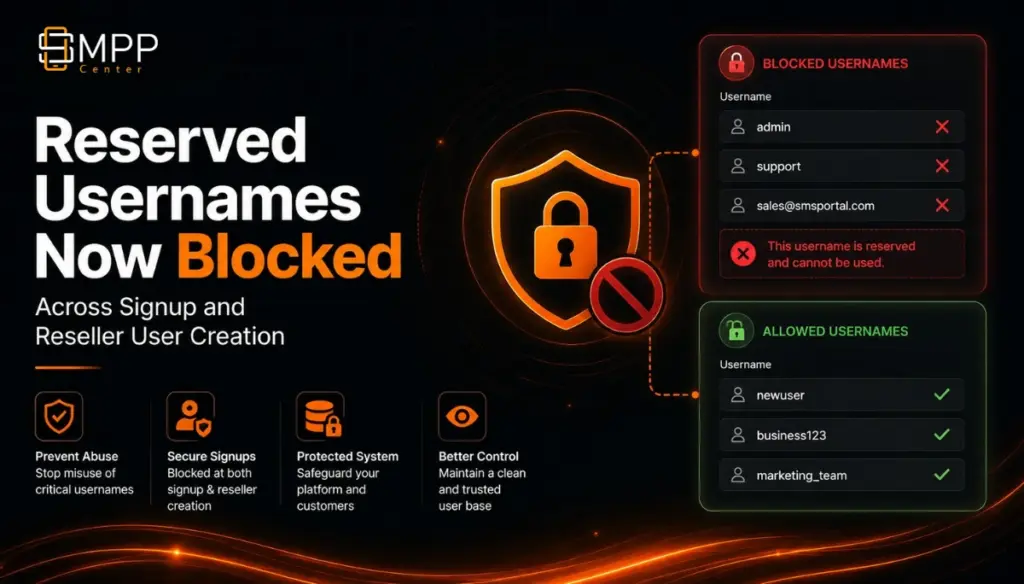
SMPP Center now blocks reserved and privileged-looking usernames on self-serve signup, reseller panel user create, and SMS API reseller user create, with live feedback, smart suggestions, and admin controls for extra brand-specific blocks.
As messaging platform operators, you already know that usernames are more than login labels. On white-label domains they sit next to your brand, appear in support tickets, and can be used by attackers who try to look like admin, support, or root.
We have rolled out reserved username protection so those names, and obvious lookalikes, cannot be registered through the normal account-creation paths.
What changed
SMPP Center now rejects reserved usernames such as admin, root, support, and other system, role, mail, and infrastructure names during account creation.
The check is not limited to exact matches. It also blocks obvious numbered or separator variants, for example:
admin1root_99support-2
Letter-extended names that look like real brands or personal handles are still allowed, for example:
myadminadminx
So the rule targets impersonation and privileged-looking identities, not every username that happens to contain those letters.
Where it applies
The same protection is enforced on all primary ways accounts are created:
- Self-serve public signup on the front/login theme pages
- Reseller panel user create under User Management
- SMS API reseller user create when accounts are provisioned through the API
That means a name blocked on signup is also blocked if someone tries to create it from the reseller panel or via API. Operators and resellers get consistent behavior instead of three different validation rules.
Better feedback while typing
On signup, username checks now give clearer live feedback:
- If the name is reserved, the user is told it is not allowed
- If the name is already taken, the system can suggest alternative available usernames
- Suggestions avoid reserved names as well, so users are not pointed toward another blocked option
The goal is fewer failed submits and fewer “why can’t I register this username?” support tickets.
Admin control in Sign up Settings
Under Sign up Settings, admins can:
- Open a modal to view the full built-in reserved usernames list
- Add extra reserved usernames for brand-specific or market-specific blocks
Extras merge with the built-in list. They do not replace it. Names already covered by the system list are cleaned up on save, so you do not maintain duplicates.
Use extras for things unique to your brand or operations, such as partner aliases, internal project names, or names you never want customers to claim on your portal.
Why this matters for white-label operators
On a pointed reseller domain, a public account named support or admin creates confusion and risk:
- Customers may trust the wrong account
- Support and abuse cases become harder to triage
- Privileged-looking names weaken the professionalism of your portal
Blocking these early is a small UX change with a meaningful security and brand benefit, especially for multi-tenant and white-label deployments.
What resellers and end users will notice
- Creating a user with a reserved name fails with a clear validation message
- Public signup shows live guidance and, when useful, alternative username suggestions
- Valid letter-extended names such as
myadmincan still be used - Username length and uniqueness rules remain in place as before
What you should do
- Review Sign up Settings and open the built-in reserved list
- Add any brand-specific extras you want blocked
- Brief reseller teams that reserved and lookalike names are rejected in panel and API user create
- Point support to the updated guidance if users ask why a name was rejected
This is a platform hardening update: clearer signup UX, safer usernames across self-serve and reseller provisioning, and admin visibility into what is blocked by default.